Skip to content

Threading: keeping the UI responsive

Any slow operation running on the main thread — a large file read, a network request, image processing, a long calculation — blocks wxRuby3’s event loop for its entire duration. The window stops responding. Buttons don’t click. The window can’t be moved or resized. On macOS the spinning beachball appears. Users assume the app has crashed.

The solution is to move slow work off the main thread. This lesson explains why that’s harder than it sounds in MRI Ruby, shows the correct approach, and gives you several working patterns to choose from.

The GIL problem

MRI Ruby (the standard Ruby interpreter) uses a Global Interpreter Lock — only one thread can execute Ruby code at any given time. The scheduler switches between threads periodically, but only at safe switching points between Ruby bytecode instructions or during blocking system calls.

wxRuby3’s event loop is a C++ loop running native Cocoa/Win32/GTK code. From Ruby’s perspective, it looks like one long uninterrupted C extension call. The scheduler has no opportunity to switch to your background thread because no safe switching point occurs — the GIL stays held by the main thread for the entire duration of the event loop.

The result: sleep in a background thread does release the GIL, but there is no guarantee the scheduler will give that time to your thread rather than back to the event loop.

JRuby and TruffleRuby have true parallel threads without a GIL. If you use either of these runtimes, background threads are scheduled by the JVM’s thread scheduler and the event loop does not starve them. The patterns in this lesson still work, but the timer fix is not strictly necessary.

We’ll be building a simple app which has a long running process (sleep) on a background thread.
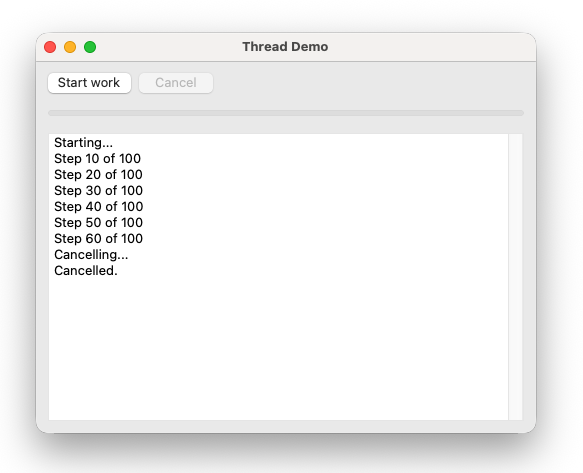
thread.png

The fix: give threads time

The solution is a global timer that fires every 25ms and calls Thread.pass — explicitly telling the Ruby scheduler to switch to another thread:

1
2
3
4
Wx::App.run do
  Wx::Timer.every(25) { Thread.pass }
  AppFrame.new.show
end

This creates regular windows during which background threads can run. The 25ms interval is taken from the official wxRuby3 threading sample — frequent enough to keep threads responsive, infrequent enough not to degrade UI performance.

Always add this line when your app uses background threads. Without it, threads will appear to hang or update the UI with long unpredictable delays.

The cardinal rule

Never touch UI widgets from a background thread.

wxRuby3’s widget methods are not thread-safe. Calling them from any thread other than the main thread causes crashes, corruption, or silent failures. Every UI update — progress bar, label text, button state — must happen on the main thread.

The patterns below all follow this rule.

Pattern 1 — call_after (simplest)

call_after schedules a block to run on the main thread at the next safe opportunity. It is the simplest way to update the UI from a background thread.

 1
 2
 3
 4
 5
 6
 7
 8
 9
10
11
12
13
14
15
16
17
18
19
20
21
22
23
24
25
26
27
28
29
30
31
32
33
34
35
36
37
38
39
40
41
42
43
44
45
46
47
48
49
50
51
52
53
54
55
56
57
58
59
60
61
62
63
64
65
66
67
68
69
70
71
72
73
74
75
76
77
78
79
80
81
82
83
84
85
86
87
88
89
90
91
92
require 'wx'

class CallAfterFrame < Wx::Frame
  def initialize
    super(nil, title: 'call_after demo', size: [500, 350])
    build_ui
    bind_events
    layout
    centre
  end

  private

  def build_ui
    @panel    = Wx::Panel.new(self)
    @progress = Wx::Gauge.new(@panel, range: 100, style: Wx::GA_HORIZONTAL)
    @log      = Wx::TextCtrl.new(@panel, value: '', style: Wx::TE_MULTILINE | Wx::TE_READONLY)
    @start_btn  = Wx::Button.new(@panel, label: 'Start')
    @cancel_btn = Wx::Button.new(@panel, label: 'Cancel')

    btn_row = Wx::HBoxSizer.new
    btn_row.add(@start_btn,  0, Wx::RIGHT, 8)
    btn_row.add(@cancel_btn, 0)

    sizer = Wx::VBoxSizer.new
    sizer.add(btn_row,   0, Wx::ALL, 12)
    sizer.add(@progress, 0, Wx::EXPAND | Wx::LEFT | Wx::RIGHT | Wx::BOTTOM, 12)
    sizer.add(@log,      1, Wx::EXPAND | Wx::LEFT | Wx::RIGHT | Wx::BOTTOM, 12)
    @panel.set_sizer(sizer)
  end

  def bind_events
    evt_close            { |event| on_close(event) }
    evt_button(@start_btn.id)  { on_start }
    evt_button(@cancel_btn.id) { on_cancel }
  end

  def on_close(event)
    @cancelled = true
    event.skip
  end

  def on_start
    @cancelled = false
    @start_btn.enable(false)
    @cancel_btn.enable(true)
    @progress.value = 0
    log('Starting...')

    @worker = Thread.new do
      100.times do |i|
        break if @cancelled
        sleep(0.05)

        # Only update UI every 10 steps — batching reduces call_after overhead
        if (i + 1) % 10 == 0 || i == 99
          call_after do
            @progress.value = i + 1
            log("Step #{i + 1} of 100")
          end
        end
      end
      call_after { on_work_complete }
    end
  end

  def on_cancel
    @cancelled = true
    @cancel_btn.enable(false)
    log('Cancelling...')
  end

  def on_work_complete
    @start_btn.enable(true)
    @cancel_btn.enable(false)
    if @cancelled
      log('Cancelled.')
      @progress.value = 0
    else
      log('Done!')
    end
  end

  def log(message)
    @log.append_text("#{message}\n")
  end
end

Wx::App.run do
  Wx::Timer.every(25) { Thread.pass }
  CallAfterFrame.new.show
end

Key points:

  • call_after is called on self (the frame) — it is a method on Wx::EvtHandler
  • Batch your call_after calls — posting one per iteration floods the callback queue. Update every N steps instead.
  • The @cancelled flag is a simple boolean. Setting it from the main thread and reading it from the background thread is safe because reading/writing a boolean is atomic in MRI Ruby.
  • Always set @cancelled = true in on_close so the thread exits cleanly when the window closes.

Pattern 2 — Custom events with queue_event

The canonical wxWidgets approach is to define a custom event class and post instances of it from the background thread using queue_event. This is thread-safe and completely decoupled — the thread knows nothing about which widgets to update.

  1
  2
  3
  4
  5
  6
  7
  8
  9
 10
 11
 12
 13
 14
 15
 16
 17
 18
 19
 20
 21
 22
 23
 24
 25
 26
 27
 28
 29
 30
 31
 32
 33
 34
 35
 36
 37
 38
 39
 40
 41
 42
 43
 44
 45
 46
 47
 48
 49
 50
 51
 52
 53
 54
 55
 56
 57
 58
 59
 60
 61
 62
 63
 64
 65
 66
 67
 68
 69
 70
 71
 72
 73
 74
 75
 76
 77
 78
 79
 80
 81
 82
 83
 84
 85
 86
 87
 88
 89
 90
 91
 92
 93
 94
 95
 96
 97
 98
 99
100
101
102
103
104
105
106
require 'wx'

# Define a custom event class outside any frame
class ProgressEvent < Wx::CommandEvent
  EVT_PROGRESS = Wx::EvtHandler.register_class(self, nil, 'evt_progress', 0)

  def initialize(step, total, message = '')
    super(EVT_PROGRESS)
    @step    = step
    @total   = total
    @message = message
  end

  attr_reader :step, :total, :message
end

class QueueEventFrame < Wx::Frame
  def initialize
    super(nil, title: 'queue_event demo', size: [500, 350])
    build_ui
    bind_events
    layout
    centre
  end

  private

  def build_ui
    @panel    = Wx::Panel.new(self)
    @progress = Wx::Gauge.new(@panel, range: 100, style: Wx::GA_HORIZONTAL)
    @log      = Wx::TextCtrl.new(@panel, value: '', style: Wx::TE_MULTILINE | Wx::TE_READONLY)
    @start_btn = Wx::Button.new(@panel, label: 'Start')
    @cancel_btn = Wx::Button.new(@panel, label: 'Cancel')

    btn_row = Wx::HBoxSizer.new
    btn_row.add(@start_btn,  0, Wx::RIGHT, 8)
    btn_row.add(@cancel_btn, 0)

    sizer = Wx::VBoxSizer.new
    sizer.add(btn_row,   0, Wx::ALL, 12)
    sizer.add(@progress,  0, Wx::EXPAND | Wx::LEFT | Wx::RIGHT | Wx::BOTTOM, 12)
    sizer.add(@log,       1, Wx::EXPAND | Wx::LEFT | Wx::RIGHT | Wx::BOTTOM, 12)
    @panel.set_sizer(sizer)
  end

  def bind_events
    evt_close              { |event| on_close(event) }
    evt_button(@start_btn.id) { on_start }
    evt_button(@cancel_btn.id) { on_cancel }
    evt_progress           { |event| on_progress(event) }
  end

  def on_close(event)
    @cancelled = true
    event.skip
  end

  def on_start
    @cancelled = false
    @start_btn.enable(false)
    @cancel_btn.enable(true)
    @progress.value = 0
    frame = self

    @worker = Thread.new do
      100.times do |i|
        break if @cancelled
        sleep(0.05)

        if (i + 1) % 10 == 0 || i == 99
          evt = ProgressEvent.new(i + 1, 100, "Step #{i + 1} of 100")
          frame.event_handler.queue_event(evt)
        end
      end
      # Signal completion — step == -1 whether finished or cancelled
      msg = @cancelled ? 'Cancelled.' : 'Done!'
      frame.event_handler.queue_event(ProgressEvent.new(-1, 100, msg))
    end
  end

  def on_cancel
    @cancelled = true
    @cancel_btn.enable(false)
  end

  def on_progress(event)
    if event.step == -1
      @start_btn.enable(true)
      @cancel_btn.enable(false)
      @progress.value = 0 if @cancelled
      log(event.message)
    else
      @progress.value = event.step
      log(event.message)
    end
  end

  def log(message)
    @log.append_text("#{message}\n")
  end
end

Wx::App.run do
  Wx::Timer.every(25) { Thread.pass }
  QueueEventFrame.new.show
end

The thread captures frame = self before starting — a local variable in the block. It then posts typed ProgressEvent objects via frame.event_handler.queue_event. The frame handles them with evt_progress, reading the event’s data to update the UI. The thread never references @progress, @log, or any widget directly.

This pattern scales well for complex applications where multiple threads post different event types to the same frame.

Pattern 3 — Thread::Queue with on_idle

A third approach uses Ruby’s built-in Thread::Queue and wxRuby3’s idle event. The background thread pushes data into the queue; the idle handler drains it on the main thread. No wxRuby3 threading mechanism is involved at all.

 1
 2
 3
 4
 5
 6
 7
 8
 9
10
11
12
13
14
15
16
17
18
19
20
21
22
23
24
25
26
27
28
29
30
31
32
33
34
35
36
37
38
39
40
41
42
43
44
45
46
47
48
49
50
51
52
53
54
55
56
57
58
59
60
61
62
63
64
65
66
67
68
69
70
71
72
73
74
75
76
77
78
79
80
81
82
83
84
85
86
87
88
89
90
91
92
93
94
95
require 'wx'

class IdleQueueFrame < Wx::Frame
  def initialize
    super(nil, title: 'Thread::Queue demo', size: [500, 350])
    @queue = Thread::Queue.new
    build_ui
    bind_events
    layout
    centre
  end

  private

  def build_ui
    @panel    = Wx::Panel.new(self)
    @progress = Wx::Gauge.new(@panel, range: 100, style: Wx::GA_HORIZONTAL)
    @log      = Wx::TextCtrl.new(@panel, value: '', style: Wx::TE_MULTILINE | Wx::TE_READONLY)
    @start_btn  = Wx::Button.new(@panel, label: 'Start')
    @cancel_btn = Wx::Button.new(@panel, label: 'Cancel')

    btn_row = Wx::HBoxSizer.new
    btn_row.add(@start_btn,  0, Wx::RIGHT, 8)
    btn_row.add(@cancel_btn, 0)

    sizer = Wx::VBoxSizer.new
    sizer.add(btn_row,   0, Wx::ALL, 12)
    sizer.add(@progress, 0, Wx::EXPAND | Wx::LEFT | Wx::RIGHT | Wx::BOTTOM, 12)
    sizer.add(@log,      1, Wx::EXPAND | Wx::LEFT | Wx::RIGHT | Wx::BOTTOM, 12)
    @panel.set_sizer(sizer)
  end

  def bind_events
    evt_close                  { |event| on_close(event) }
    evt_button(@start_btn.id)  { on_start }
    evt_button(@cancel_btn.id) { on_cancel }
    evt_idle                   { |event| on_idle(event) }
  end

  def on_close(event)
    @cancelled = true
    event.skip
  end

  def on_start
    @cancelled  = false
    @working    = true
    @start_btn.enable(false)
    @cancel_btn.enable(true)
    @progress.value = 0
    @worker = Thread.new do
      100.times do |i|
        break if @cancelled
        sleep(0.05)
        @queue << { step: i + 1, message: "Step #{i + 1}" } if (i + 1) % 10 == 0
      end
      @queue << { step: :done, message: @cancelled ? 'Cancelled.' : 'Done!' }
    end
  end

  def on_cancel
    @cancelled = true
    @cancel_btn.enable(false)
  end

  def on_idle(event)
    return unless @working
    loop do
      item = @queue.shift(true) rescue nil
      break unless item
      if item[:step] == :done
        @working = false
        @start_btn.enable(true)
        @cancel_btn.enable(false)
        @progress.value = 0 if @cancelled
        log(item[:message])
      else
        @progress.value = item[:step]
        log(item[:message])
      end
    end
    event.request_more if @working
    event.skip
  end

  def log(message)
    @log.append_text("#{message}\n")
  end
end


Wx::App.run do
  Wx::Timer.every(25) { Thread.pass }
  IdleQueueFrame.new.show
end

Thread::Queue is thread-safe by design — no extra synchronisation needed. The idle handler uses shift(true) (non-blocking) with a rescue nil to drain all available items without waiting. event.request_more keeps idle events firing while work is in progress; event.skip passes the idle event up so wxRuby3’s own idle processing continues.

Pattern 4 — Fibers (cooperative multitasking)

Fibers are not threads — they run on the main thread and yield control explicitly. This means no GIL issues and no Thread.pass timer needed. The trade-off is that you must break your work into small chunks and yield between them.

 1
 2
 3
 4
 5
 6
 7
 8
 9
10
11
12
13
14
15
16
17
18
19
20
21
22
23
24
25
26
27
28
29
30
31
32
33
34
35
36
37
38
39
40
41
42
43
44
45
46
47
48
49
50
51
52
53
54
55
56
57
58
59
60
61
62
63
64
65
66
67
68
69
70
71
72
73
74
75
76
77
78
79
80
81
82
83
84
85
86
87
88
89
90
91
92
93
94
95
require 'wx'

class FiberFrame < Wx::Frame
  def initialize
    super(nil, title: 'Fiber demo', size: [500, 350])
    @fiber     = nil
    @working   = false
    @cancelled = false
    build_ui
    bind_events
    layout
    centre
  end

  private

  def build_ui
    @panel    = Wx::Panel.new(self)
    @progress = Wx::Gauge.new(@panel, range: 100, style: Wx::GA_HORIZONTAL)
    @log      = Wx::TextCtrl.new(@panel, value: '', style: Wx::TE_MULTILINE | Wx::TE_READONLY)
    @start_btn  = Wx::Button.new(@panel, label: 'Start')
    @cancel_btn = Wx::Button.new(@panel, label: 'Cancel')

    btn_row = Wx::HBoxSizer.new
    btn_row.add(@start_btn,  0, Wx::RIGHT, 8)
    btn_row.add(@cancel_btn, 0)

    sizer = Wx::VBoxSizer.new
    sizer.add(btn_row,   0, Wx::ALL, 12)
    sizer.add(@progress, 0, Wx::EXPAND | Wx::LEFT | Wx::RIGHT | Wx::BOTTOM, 12)
    sizer.add(@log,      1, Wx::EXPAND | Wx::LEFT | Wx::RIGHT | Wx::BOTTOM, 12)
    @panel.set_sizer(sizer)
  end

  def bind_events
    evt_close                  { |event| on_close(event) }
    evt_button(@start_btn.id)  { on_start }
    evt_button(@cancel_btn.id) { on_cancel }
    evt_idle                   { |event| on_idle(event) }
  end

  def on_close(event)
    event.skip
  end

  def on_start
    @cancelled = false
    @working   = true
    @start_btn.enable(false)
    @cancel_btn.enable(true)
    @progress.value = 0

    @fiber = Fiber.new do
      100.times do |i|
        sleep(0.05)
        Fiber.yield(i + 1)
      end
      nil
    end
  end

  def on_cancel
    @cancelled = true
    @working   = false
    @cancel_btn.enable(false)
    @start_btn.enable(true)
    @progress.value = 0
    log('Cancelled.')
  end

  def on_idle(event)
    return unless @working && @fiber&.alive?

    result = @fiber.resume

    if result.nil?
      @working = false
      @start_btn.enable(true)
      @cancel_btn.enable(false)
      log('Done!')
    else
      @progress.value = result
      log("Step #{result}") if result % 10 == 0
      event.request_more
    end

    event.skip
  end

  def log(message)
    @log.append_text("#{message}\n")
  end
end

Wx::App.run { FiberFrame.new.show }

Notice that Wx::Timer.every(25) { Thread.pass } is not needed here — fibers run on the main thread and the idle event drives their execution. Each call to on_idle resumes the fiber for one step, then returns control to the event loop. event.request_more ensures idle events keep firing.

Fibers work well for CPU-bound work that can be broken into small chunks. They are less suitable for IO-bound work where you need to wait for a network response or file read — use threads for those.

Choosing the right pattern

Pattern Best for GIL timer needed
call_after Simple progress updates, most common case Yes
queue_event Complex apps, multiple thread types, decoupled design Yes
Thread::Queue + on_idle Pure Ruby preference, no wxRuby3 event classes Yes
Fibers CPU-bound work that can be chunked No

Thread safety checklist

Before shipping any threaded code, verify:

  • Wx::Timer.every(25) { Thread.pass } is in Wx::App.run (MRI Ruby)
  • No UI widget is touched directly from a background thread
  • All UI updates go through call_after, queue_event, or Thread::Queue + idle
  • @cancelled = true is set in on_close so threads exit cleanly
  • The background thread checks @cancelled regularly
  • call_after updates are batched — not posted on every iteration
  • Long-running work is in the thread, not in call_after blocks

When not to use threads

Not every slow operation needs a thread. If the operation completes in under 200ms on typical hardware, the freeze is imperceptible. Use Wx::BusyCursor to signal that work is happening:

1
2
3
Wx::BusyCursor.busy do
  process_small_file(path)   # fast-ish — cursor becomes a spinner
end

The cursor reverts automatically when the block exits.


Previous: File I/O and preferences | Next: Capstone: file processor