HtmlWindow
Wx::HTML::HtmlWindow is a lightweight HTML renderer built into wxRuby3. It handles a useful subset of HTML — headings, paragraphs, lists, tables, inline formatting, images, links, and horizontal rules — without requiring a full browser engine. It is the right tool when you need to display formatted content that you control and know will be straightforward HTML.
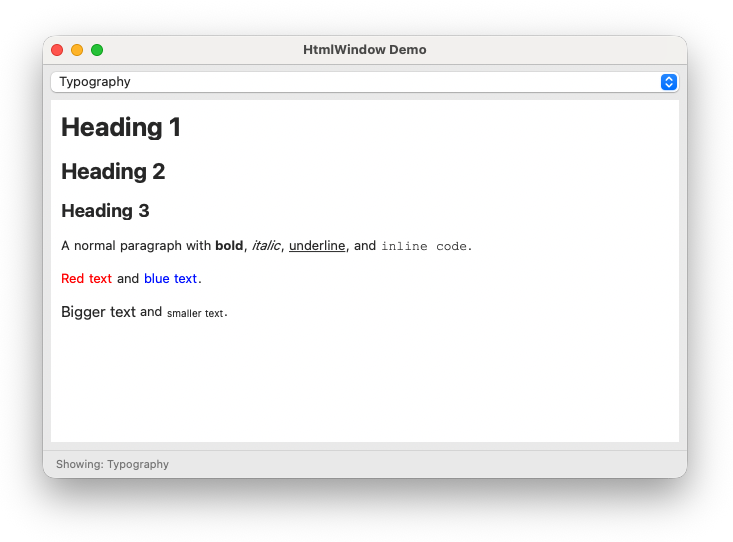
Note the namespace: it is Wx::HTML (all caps), not Wx::Html.
When to use HtmlWindow
Use HtmlWindow when:
- Displaying formatted help text, documentation, or reports
- Rendering markdown output (via a converter like kramdown)
- Showing structured content with headings, lists, and tables
- You want simplicity and no external dependencies
Use WebView (Module 5) when:
- You need full CSS support
- You need JavaScript execution
- You need syntax highlighting in code blocks
- You are loading external web pages
- You need a bidirectional JavaScript bridge
Creating a HtmlWindow
|
|
Optionally set a larger base font size — the default is quite small:
|
|
Loading content
Load an HTML string directly with set_page:
|
|
The content can be a full HTML document or a fragment — HtmlWindow is forgiving about missing <html> and <body> tags.
Load from a file with load_page:
|
|
What HTML it supports
HtmlWindow handles the basics well:
- Headings (
<h1>through<h6>) - Paragraphs, line breaks, horizontal rules
- Bold, italic, underline, code (
<b>,<i>,<u>,<code>) - Font colour and size (
<font color="..." size="...">) - Unordered and ordered lists, including nested lists
- Tables with
borderandcellpadding <pre>and<code>blocks- Blockquotes
- Hyperlinks
- Inline images (
<img src="...">for local files)
It does not support CSS stylesheets, JavaScript, or modern HTML5 elements. For those you need WebView.
Handling link clicks
Register evt_html_link_clicked to intercept link clicks:
|
|
Without this handler, HtmlWindow will attempt to navigate to clicked links itself, which may produce unexpected results for non-HTTP URLs.
Generating HTML from data
For dynamic content, build the HTML string in Ruby:
|
|
See html_window_demo.rb for the complete demonstration including a page selector and link click handling.
What to take forward
- Namespace is
Wx::HTML(all caps) notWx::Html set_page(html_string)for inline content;load_page(path)for filesset_standard_fonts(size)to increase the default font sizeevt_html_link_clickedto intercept link clicks- Good for static formatted content; use WebView when you need CSS, JavaScript, or external pages
Previous: Rich text | Next: Capstone: Markdown editor