Project: Markdown editor
This project builds a side-by-side markdown editor with live preview — a useful tool that ties together the file I/O patterns from Module 3 with the HtmlWindow display from lesson 4.4.
Note: in this module we’re using the simple
Wx::HTMLwindow, we will enhance the project in the next module using the more advancedWx::Webviewcontrol
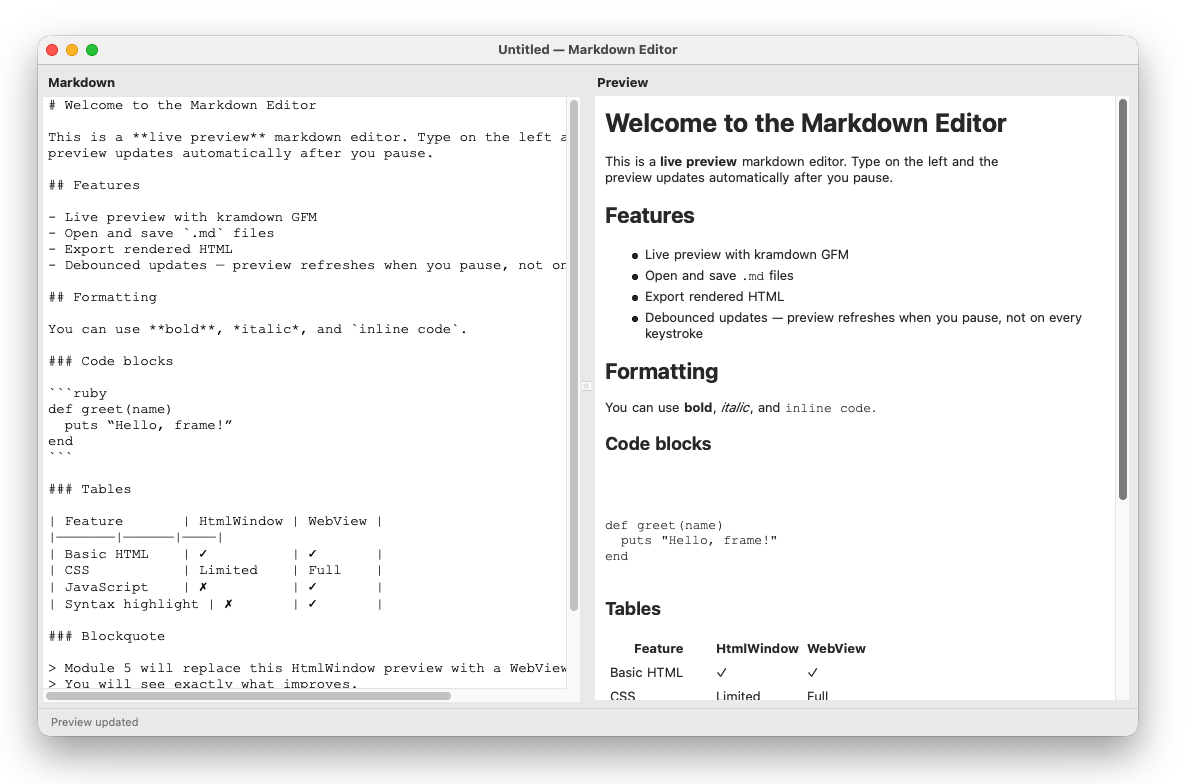
Type markdown on the left. The preview on the right updates automatically when you pause. Open and save .md files. Export the rendered HTML.
To run the program you’ll need to install the kramdown parser (this is one of several available markdown parsers for ruby). Check the Gemfile in the project root to see what’s been added.
|
|
File structure
markdown_editor/
├── main.rb
├── Gemfile
└── lib/
    ├── editor_frame.rb
    ├── models/
    │   └── markdown_document.rb
    └── panels/
        ├── editor_panel.rb
        └── preview_panel.rb
The model
MarkdownDocument follows the same pattern as the Document class in lesson 3.4 — it holds file path, content, and dirty state, with load, save, and save_as methods. The only addition is to_html and to_full_html, which convert the markdown content using kramdown:
|
|
input: 'GFM' selects the GitHub Flavoured Markdown parser, which adds support for fenced code blocks, tables, and strikethrough. The model knows nothing about widgets — it is pure Ruby.
The editor panel
A Wx::TextCtrl with a monospace font and Wx::TE_DONTWRAP to prevent line wrapping. The callback pattern from lesson 3.4 applies: evt_key_up is registered directly on the @editor widget (not the parent panel), and calls the on_change callback when the user types.
The monospace font is important for markdown editing — it makes heading markers, list indicators, and code fences easy to read in the source.
The preview panel
A Wx::HTML::HtmlWindow with set_standard_fonts(13) for a readable base size. The update(html) method calls set_page to replace the displayed content. Link clicks are intercepted — external http links open in the default browser; other links are ignored.
The frame
The frame coordinates the two panels and handles all file operations. Two details worth highlighting:
Debounced preview updates
Converting markdown and updating the preview on every single keystroke would cause noticeable lag for long documents. Instead, the app uses a one-shot timer as a debounce:
|
|
Every keypress restarts the timer. The preview only updates when the user pauses for 300ms. Wx::TIMER_ONE_SHOT means the timer fires once and stops — it does not repeat.
The @loading flag
Setting @editor.content = programmatically triggers evt_key_up which would call on_text_changed and mark the document dirty. The @loading flag suppresses this — the same pattern established in lesson 3.4.
|
|
HtmlWindow limitations visible here
Open the sample content and look at the table and the code block. They render, but:
- Code blocks have no syntax highlighting
- The table has basic styling only — no alternating row colours, no CSS
- Font choices are limited
In Module 5 we will replace PreviewPanel with a WebView-based equivalent. The model and editor panel stay exactly the same — only the preview changes. That comparison will show precisely what WebView adds over HtmlWindow.
What this project demonstrates
Every concept from Module 4 either appears directly or is referenced:
- Device contexts — the monospace editor font is set exactly as in lesson 4.1
- HtmlWindow — the preview panel, with link interception from lesson 4.4
- Debounced timer — a new pattern:
Wx::TIMER_ONE_SHOTfor deferred updates - Module 3 patterns — multi-file structure, model/panel separation,
@loadingflag, file dialogs, dirty state, confirm on close
Previous: HtmlWindow | Next: Module 5 — WebView