Lesson 08 — Real-Time Charts via ActionCable
What We’re Building
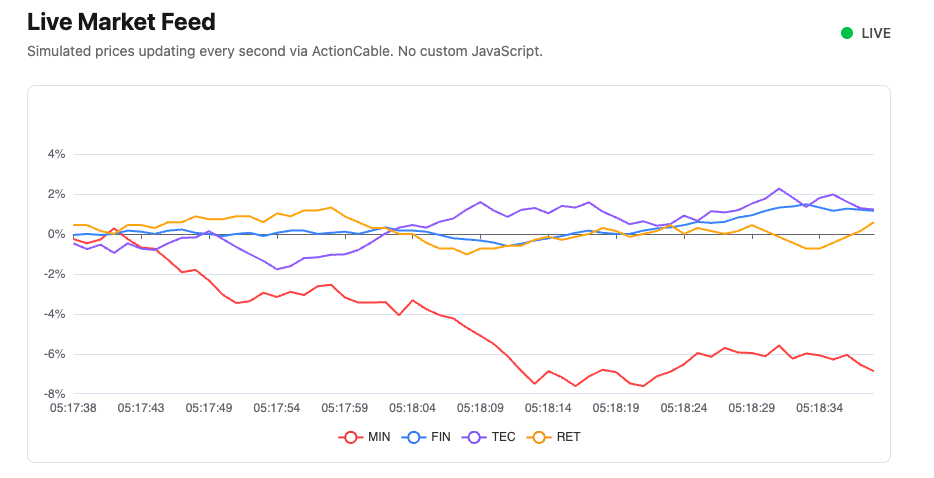
A live stock price chart — four simulated stocks updating every second — with no custom JavaScript.
Any chart in this series can become real-time by adding one prop. The
chart_controller.js we built in Module 01 — extended by a few lines in the
appendix — handles everything. Our job is entirely in Ruby.
Here’s what it looks like:
8.1 — What You Need
The stream_name: prop
Add stream_name: to any chart component and pass it to the mount div:
|
|
When stream_name is present, chart_controller.js subscribes to the named
ActionCable stream automatically. When a broadcast arrives it merges the incoming
ECharts options with the current options and calls setOption. The chart updates
in place — no flicker, no state loss.
Two chart options to set
animation: false — essential for real-time. Without it ECharts animates
every setOption call, producing distracting transitions at 1Hz.
Empty initial data — the broadcaster fills the series and x axis on the first tick. Start with empty arrays:
|
|
Custom tooltip formatter (optional)
For a multi-stock percentage change chart, add to custom_chart_formatters.js:
|
|
Then reference it from Ruby:
|
|
8.2 — The Channel
One generic channel handles all real-time charts in the application. Different charts subscribe to different streams through the same channel:
|
|
params[:stream] receives the stream name from the JavaScript subscription —
{ channel: "ChartChannel", stream: "live_stocks" }. This channel is written
once and never touched again regardless of how many real-time charts you add.
8.3 — The Broadcaster
The broadcaster is the Ruby code that generates or receives data and sends it to the stream. In a real application this would be a Sidekiq job, a WebSocket client connected to an external API, or a webhook receiver.
The broadcaster sends ECharts options JSON — full or partial. The controller merges incoming data with the current options, so you only need to send what changed:
|
|
The receiving controller does:
|
|
Stimulus detects the attribute change, optionsValueChanged fires, setOption
is called. The chart updates.
Scalability: The broadcaster sends one message per tick regardless of how many clients are connected. ActionCable fans it out — one message in, N deliveries out. Whether you have 10 clients or 10,000, the broadcaster does the same work. Scalability is determined by ActionCable and its backing store (Redis in production) — not by client-side code.
8.4 — The Component and View
|
|
|
|
|
|
<%# app/views/charts/live_stocks.html.erb %>
<%= content_for :head do %>
  <meta name="turbo-cache-control" content="no-cache">
<% end %>

<div class="max-w-4xl mx-auto px-4 py-8">
  <div class="flex items-center justify-between mb-6">
    <div>
      <h1 class="text-2xl font-bold">Live Market Feed</h1>
      <p class="text-neutral-500 text-sm mt-1">
        Simulated prices updating every second via ActionCable.
        No custom JavaScript.
      </p>
    </div>
    <div class="flex items-center gap-2">
      <span class="relative flex h-3 w-3">
        <span class="animate-ping absolute inline-flex h-full w-full
                     rounded-full bg-green-400 opacity-75"></span>
        <span class="relative inline-flex rounded-full h-3 w-3 bg-green-500"></span>
      </span>
      <span class="text-sm font-medium text-neutral-600">LIVE</span>
    </div>
  </div>

  <%= render Components::Charts::LiveStocks.new(
    prices:      @prices,
    stream_name: "live_stocks",
    height:      "400px"
  ) %>
</div>
8.5 — Gallery
<%= render "charts/gallery_card",
  title:       "Live Market Feed",
  description: "Four simulated stocks updating every second via ActionCable. "\
               "No custom JavaScript.",
  path:        charts_live_stocks_path %>
8.6 — Housekeeping: ActionCable Setup
If ActionCable was not included when your app was generated, run:
|
|
This creates the base channel classes, adds the ActionCable mount to routes.rb,
and creates config/cable.yml. Then add two importmap pins manually:
|
|
Add yield :head to the application layout — this allows individual views to
inject content into <head>:
<%# app/views/layouts/application.html.erb %>
<head>
  <title>...</title>
  <%= yield :head %>
  ...
</head>
This is a general-purpose pattern useful beyond this module — any view can inject
page-specific meta tags, preload hints, or canonical URLs using content_for :head.
8.7 — Housekeeping: The Simulation
StockFeed simulates a live data source using a random walk. In a real application
replace this with your actual data source:
|
|
The broadcaster thread runs in an initializer. In production this would be a Sidekiq job or an external connection — the broadcaster pattern is the same:
|
|
Why percentage change? Four stocks at very different price levels ($6 to $95) on a shared Y axis would make movements of the cheaper stocks invisible. Percentage change from the opening price puts all four on a comparable scale — standard practice for multi-stock comparison charts.
Why a rolling 60-point window? The chart shows the last 60 seconds. The
broadcaster maintains this buffer — history[symbol].shift removes the oldest
point as each new one arrives.
8.8 — Housekeeping: Demo-Specific Behaviour
Start/stop via the channel lifecycle
In production a broadcaster runs continuously. For this demo we only want broadcasting when someone is viewing the chart — otherwise the development log fills with noise.
Update ChartChannel to start and stop the feed via the subscription lifecycle:
|
|
When a client subscribes — visiting the live stocks page — StockFeed.start!
resets prices to opening values and sets the broadcasting flag. The broadcaster
thread checks this flag each second. When the client navigates away and
unsubscribed fires, StockFeed.stop! clears the flag — no more broadcasts,
no log noise.
Each new visit starts fresh from 0% because start! resets @prices.
Turbo cache control
Turbo caches pages as you navigate away so it can restore them instantly. For this page that causes a problem — the cached page’s chart controller does not disconnect, so navigating back does not trigger a fresh connect, and the feed does not reset.
The content_for :head block in the view (section 9.4) adds:
<meta name="turbo-cache-control" content="no-cache">This tells Turbo not to cache this specific page. Every other page in the
application caches normally. When the user navigates away and returns, Rails
serves a fresh page — the controller connects, subscribed fires, start!
resets the feed, and the chart begins fresh from 0%.
8.9 — Module Summary
New files:
| File | Purpose |
|---|---|
app/lib/stock_feed.rb |
Simulated price generator (replace with real source) |
config/initializers/stock_broadcaster.rb |
Broadcaster thread (simulation) |
app/channels/chart_channel.rb |
Generic channel for all real-time charts |
app/views/components/charts/live_stocks.rb |
Live chart component |
To make any chart real-time:
- Add
stream_name:prop to the component - Pass it as
chart_stream_name_valueto the mount div - Set
animation: falseand start with empty series data - Create
ChartChannel(once — reused by all live charts) - Write a broadcaster that sends ECharts options JSON to the stream
Patterns introduced:
stream_name:prop — opt-in real-time at the component level- Generic
ChartChannel— one channel for all real-time charts - Partial broadcaster payload — send only what changed, merge on client
animation: false— required for real-time performancescale: true— Y axis auto-scale for multi-value charts- Percentage change from open — comparable scale for multi-stock display
- Rolling window — bounded history buffer in the broadcaster
yield :headin layout — general pattern for page-specific head contentcontent_for :head— page-specific meta tag injectionturbo-cache-control: no-cache— clean connect/disconnect lifecyclesubscribed/unsubscribed— channel lifecycle for start/stop control