Skip to content

Module 09 — Advanced Label Formatting

What We’re Building

ECharts has a sophisticated label system that goes well beyond simple value display. This module covers the techniques that make charts genuinely informative rather than merely decorative — rich text labels, annotations, reference lines, shaded regions, and conditional label display.

We use two datasets throughout:

  • GDP by Industry — for rich text labels on bar charts
  • National Accounts — for markLine and markArea annotations on line charts

By the end of this module you will have:

  • Rich text labels with styled segments, colours, and backgrounds
  • markLine — threshold lines, average lines, custom annotations
  • markArea — shaded regions highlighting significant periods
  • Label positioning and overlap avoidance
  • Conditional labels using markPoint

Here’s what it will look like:
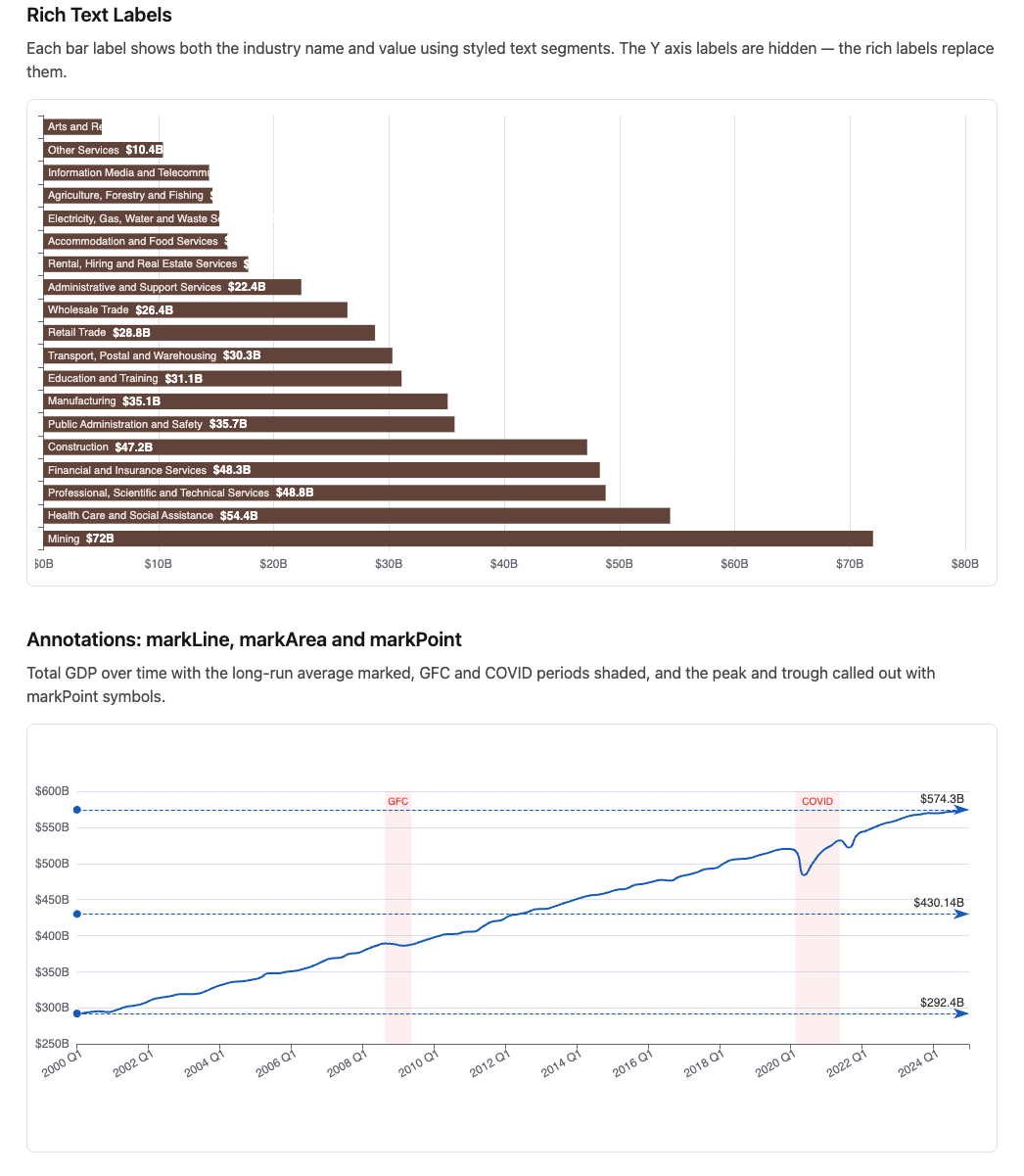
avanced_labels.png


9.1 — Rich Text Labels

ECharts labels normally display a single formatted value. The rich property allows a label to contain multiple styled text segments — different fonts, sizes, colours, and backgrounds within one label.

The rich property

 1
 2
 3
 4
 5
 6
 7
 8
 9
10
11
12
13
14
15
16
17
label: {
  show:      true,
  formatter: "{industry|{b}}\n{value|${c}B}",
  rich: {
    industry: {
      fontSize:   11,
      color:      "rgba(255,255,255,0.85)",
      lineHeight: 18
    },
    value: {
      fontSize:   13,
      fontWeight: "bold",
      color:      "#fff",
      lineHeight: 20
    }
  }
}

The formatter string uses {styleName|text} syntax. Each named style in rich applies to its segment. ECharts template variables {b}, {c}, {d} work inside rich segments.

The service

 1
 2
 3
 4
 5
 6
 7
 8
 9
10
11
12
13
14
15
16
17
# app/services/stats/gdp_latest_quarter.rb
module Stats
  module GdpLatestQuarter
    extend self

    def call
      latest_year    = GdpReading.maximum(:year)
      latest_quarter = GdpReading.where(year: latest_year).maximum(:quarter)

      GdpReading
        .where(year: latest_year, quarter: latest_quarter)
        .order(value_billions: :desc)
        .pluck(:industry, :value_billions)
        .map { |industry, value| { industry: industry, value: value.to_f.round(1) } }
    end
  end
end

The component

A horizontal bar chart where each bar label shows the industry name and value — the axis labels are hidden because the rich labels replace them:

 1
 2
 3
 4
 5
 6
 7
 8
 9
10
11
12
13
14
15
16
17
18
19
20
21
22
23
24
25
26
27
28
29
30
31
32
33
34
35
36
37
38
39
40
41
42
43
44
45
46
47
48
49
50
# app/views/components/charts/gdp_rich_labels.rb
module Components
  module Charts
    class GdpRichLabels < Components::Chart
      prop :data, _Any, default: -> { [] }

      private

      def chart_options
        ::Chart::Options.new(
          color:   "earth",
          tooltip: { trigger: "axis", formatter: "thousands" },
          x_axis:  {
            type:      "value",
            axisLabel: { formatter: "${value}B" }
          },
          y_axis:  {
            type:      "category",
            data:      @data.map { |r| r[:industry] },
            axisLabel: { show: false }
          },
          grid:    { left: 8, right: 24, top: 8, bottom: 8, containLabel: true },
          series: [
            ::Chart::Series::Bar.new(
              data:  @data.map { |r| r[:value] },
              label: {
                show:      true,
                position:  "insideLeft",
                formatter: "{industry|{b}}  {value|${c}B}",
                rich: {
                  industry: {
                    fontSize:   11,
                    color:      "rgba(255,255,255,0.85)",
                    lineHeight: 20
                  },
                  value: {
                    fontSize:   12,
                    fontWeight: "bold",
                    color:      "#fff",
                    lineHeight: 20
                  }
                }
              }
            )
          ]
        )
      end
    end
  end
end

axisLabel: { show: false } hides the default Y axis labels — the rich labels inside the bars replace them entirely. position: "insideLeft" places the label at the left edge of each bar, inside the fill.


9.2 — markLine

markLine adds reference lines to a series. Lines can be at a statistical value (average, min, max), a fixed value, or between two points.

markLine data formats

 1
 2
 3
 4
 5
 6
 7
 8
 9
10
11
# Statistical
{ type: "average" }
{ type: "min" }
{ type: "max" }

# Fixed value
{ yAxis: 450.0, name: "Target" }
{ xAxis: "2020 Q1", name: "COVID start" }

# Segment between two x positions
[{ xAxis: "2020 Q1" }, { xAxis: "2021 Q2" }]

The service

 1
 2
 3
 4
 5
 6
 7
 8
 9
10
11
12
13
14
15
16
# app/services/stats/gdp_trend.rb
module Stats
  module GdpTrend
    extend self

    def call
      GdpReading
        .where(industry: "Total industries")
        .order(:year, :quarter)
        .pluck(:year, :quarter, :value_billions)
        .map { |year, quarter, value|
          { label: "#{year} Q#{quarter}", value: value.to_f.round(1) }
        }
    end
  end
end

The component

A GDP trend line with average, GFC low, and recent peak marked:

 1
 2
 3
 4
 5
 6
 7
 8
 9
10
11
12
13
14
15
16
17
18
19
20
21
22
23
24
25
26
27
28
29
30
31
32
33
34
35
36
37
38
39
40
41
42
43
44
45
46
47
# app/views/components/charts/gdp_trend.rb
module Components
  module Charts
    class GdpTrend < Components::Chart
      prop :data, _Any, default: -> { [] }

      private

      def chart_options
        values = @data.map { |r| r[:value] }

        ::Chart::Options.new(
          color:   "cool",
          tooltip: { trigger: "axis", formatter: "thousands" },
          x_axis:  {
            type:      "category",
            data:      @data.map { |r| r[:label] },
            axisLabel: { interval: 7, rotate: 30 }
          },
          y_axis:  {
            type:      "value",
            scale:     true,
            axisLabel: { formatter: "${value}B" }
          },
          grid:    { bottom: 60, left: 8, right: 8, containLabel: true },
          series: [
            ::Chart::Series::Line.new(
              name:   "GDP",
              data:   values,
              smooth: true,
              symbol: "none",
              markLine: {
                silent: true,
                data: [
                  { type: "average", name: "Average" },
                  { yAxis: values.min, name: "GFC Low"      },
                  { yAxis: values.max, name: "Recent Peak"  }
                ],
                label: { formatter: "{b}: ${c}B" }
              }
            )
          ]
        )
      end
    end
  end
end

axisLabel: { interval: 7, rotate: 30 } — shows every 8th label (one per year for quarterly data) rotated 30 degrees to prevent overlap.

{ b } in the markLine label formatter refers to the line’s name. {c} is the value at that line.


9.3 — markArea

markArea shades a region of the chart — useful for highlighting significant periods like the GFC, the COVID disruption, or policy change windows.

 1
 2
 3
 4
 5
 6
 7
 8
 9
10
11
12
13
14
15
16
17
18
19
markArea: {
  silent:    true,
  itemStyle: { color: "rgba(239, 68, 68, 0.08)" },
  label: {
    position: "insideTop",
    color:    "#ef4444",
    fontSize: 11
  },
  data: [
    [
      { xAxis: "2020 Q1", name: "COVID\nDisruption" },
      { xAxis: "2021 Q2" }
    ],
    [
      { xAxis: "2008 Q3", name: "GFC" },
      { xAxis: "2009 Q2" }
    ]
  ]
}

Each entry in data is a pair — start and end coordinates. Multiple areas can be defined in one markArea. The label on the first coordinate of each pair becomes the area label.

Combined markLine and markArea

Add both to the GDP trend component:

 1
 2
 3
 4
 5
 6
 7
 8
 9
10
11
12
13
14
15
16
17
18
19
20
21
22
23
24
::Chart::Series::Line.new(
              name:   "GDP",
              data:   values,
              smooth: true,
              symbol: "none",
              markLine: {
                silent: true,
                data: [
                  { type: "average", name: "Average" },
                  { yAxis: values.min, name: "GFC Low"      },
                  { yAxis: values.max, name: "Recent Peak"  }
                ],
                label:  { formatter: "${c}B", position: "insideEndTop" }
              },
              markArea: {
                silent:    true,
                itemStyle: { color: "rgba(239, 68, 68, 0.08)" },
                label: { position: "insideTop", color: "#ef4444", fontSize: 10 },
                data: [
                  [{ xAxis: "2008 Q3", name: "GFC"   }, { xAxis: "2009 Q2" }],
                  [{ xAxis: "2020 Q1", name: "COVID" }, { xAxis: "2021 Q2" }]
                ]
              }
            )

9.4 — Label Positioning

Position values

Position Description
"top" Above the data point
"bottom" Below the data point
"inside" Centred within the bar
"insideLeft" Left edge, inside
"insideRight" Right edge, inside
"insideTop" Top edge, inside
"outside" Outside the shape (pie/donut)

Avoiding label overlap

For dense charts, labelLayout hides overlapping labels automatically:

1
2
3
4
5
label: {
  show:        true,
  formatter:   "${c}B",
  labelLayout: { hideOverlap: true }
}

ECharts keeps the most significant labels visible and hides those that would collide — no manual calculation needed.

markPoint — labelling significant data points

Rather than labelling every data point, markPoint places a symbol at the min and max only:

 1
 2
 3
 4
 5
 6
 7
 8
 9
10
11
12
13
::Chart::Series::Line.new(
  name:      "GDP",
  data:      values,
  label:     { show: false },
  markPoint: {
    data: [
      { type: "max", name: "Peak",   symbolSize: 40 },
      { type: "min", name: "Trough", symbolSize: 30,
        symbol: "arrow", symbolRotate: 180 }
    ],
    label: { formatter: "${c}B", fontSize: 10 }
  }
)

type: "max" and type: "min" find the extremes automatically. Combine with markLine and markArea for a fully annotated chart.


9.5 — The Showcase Page

1
2
3
4
5
# app/controllers/charts_controller.rb
def label_formatting
  @gdp_bars  = Stats::GdpLatestQuarter.call
  @gdp_trend = Stats::GdpTrend.call
end
1
2
# config/routes.rb
get "charts/label_formatting", to: "charts#label_formatting"
<%# app/views/charts/label_formatting.html.erb %>
<div class="max-w-5xl mx-auto px-4 py-8">

  <h1 class="text-3xl font-bold mb-2">Advanced Label Formatting</h1>
  <p class="text-neutral-500 text-sm mb-8">
    Source: ABS GDP by Industry and National Accounts, CC BY 4.0.
  </p>

  <h2 class="text-xl font-semibold mb-2">Rich Text Labels</h2>
  <p class="text-neutral-600 mb-4">
    Each bar label shows both the industry name and value using styled text
    segments. The Y axis labels are hidden — the rich labels replace them.
  </p>
  <%= render Components::Charts::GdpRichLabels.new(
    data:   @gdp_bars,
    height: "480px"
  ) %>

  <h2 class="text-xl font-semibold mt-10 mb-2">
    Annotations: markLine, markArea and markPoint
  </h2>
  <p class="text-neutral-600 mb-4">
    Total GDP over time with the long-run average marked, GFC and COVID
    periods shaded, and the peak and trough called out with markPoint symbols.
  </p>
  <%= render Components::Charts::GdpTrend.new(
    data:   @gdp_trend,
    height: "420px"
  ) %>

  <div class="border-t border-neutral-200 pt-6 mt-8">
    <p class="text-neutral-400 text-xs">
      Data: Australian Bureau of Statistics. CC BY 4.0.
    </p>
  </div>

</div>

9.6 — Gallery

<%= render "charts/gallery_card",
  title:       "Advanced Label Formatting",
  description: "Rich text labels, markLine, markArea, markPoint, "\
               "and label overlap avoidance.",
  path:        charts_label_formatting_path %>

9.7 — Module Summary

New files:

File Purpose
app/services/stats/gdp_latest_quarter.rb Latest quarter GDP by industry
app/services/stats/gdp_trend.rb GDP total over time
app/views/components/charts/gdp_rich_labels.rb Rich text label bar chart
app/views/components/charts/gdp_trend.rb Annotated trend line

Patterns introduced:

  • Rich text labels — rich property, {styleName|text} formatter syntax
  • markLine — average, min/max, and fixed value reference lines
  • markArea — shaded regions with labels for significant periods
  • Combined markLine + markArea + markPoint — layered annotations
  • markPoint — symbols at min/max data points
  • labelLayout: { hideOverlap: true } — automatic overlap avoidance
  • axisLabel: { interval: N, rotate: N } — label density on category axes

Rich text formatter syntax:

"{styleName|content}"   — styled segment
"{b}"                   — data name (series or bar label)
"{c}"                   — data value
"{d}"                   — percentage (pie charts)
"\n"                    — line break within label

markLine data quick reference:

1
2
3
4
5
6
{ type: "average" }                        # horizontal average
{ type: "min" }                            # horizontal minimum
{ type: "max" }                            # horizontal maximum
{ yAxis: 450.0, name: "Label" }            # fixed horizontal
{ xAxis: "2020 Q1", name: "Label" }        # fixed vertical
[{ xAxis: "2020 Q1" }, { xAxis: "B" }]    # segment