Lesson 11 — Mixed Charts and Multiple Axes: Wages vs Inflation
What We’re Building
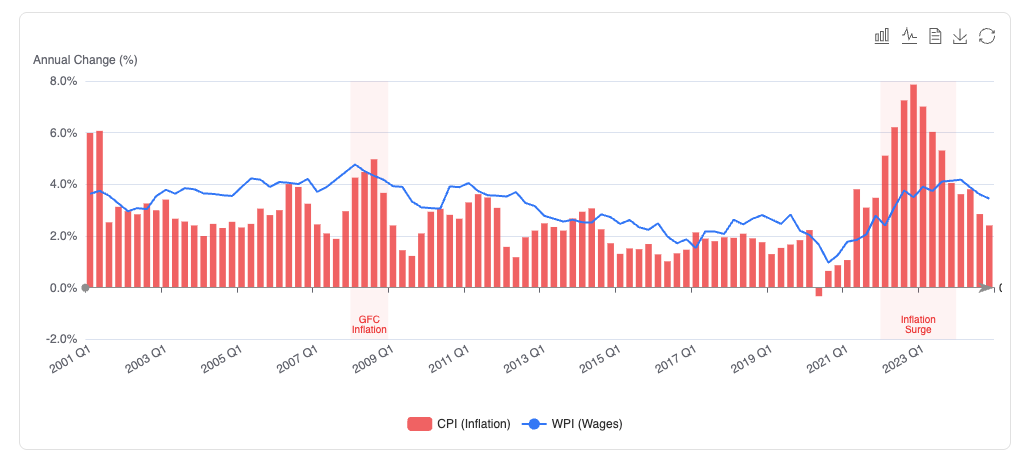
The wages vs inflation story is one of the most discussed economic narratives in Australia. Are workers’ wages keeping pace with rising prices? A mixed bar and line chart on a single axis answers this clearly — bars for CPI change, a line for wage growth, the gap between them visible at a glance.
A second chart adds GDP volume on a dual Y axis — showing the relationship between economic output and price growth on the same canvas despite their different units and scales.
This module pulls together techniques from across the series: the DSL, formatters,
palettes, markLine, markArea, and the ECharts toolbox.
By the end of this module you will have:
- A mixed bar + line chart on a single Y axis
- A dual Y axis chart with two different units
markAreahighlighting periods where wages fell behind inflationmarkLineat zero — the real wage growth reference line- ECharts toolbox with
magicType,saveAsImage, anddataView
11.1 — The Data Story
The WPI (Wage Price Index) and CPI (Consumer Price Index) are both quarterly index series from 2000–2024. Plotting the raw index values is less useful than plotting the year-on-year percentage change — that shows whether wages are rising faster or slower than prices in any given quarter.
The service computes percentage change from the index values:
pct_change = ((current - previous_year) / previous_year) * 100Where previous_year is the reading four quarters prior — the same quarter in
the previous year.
11.2 — The Service
|
|
The pct_change private method is used for both WPI and CPI — same calculation,
different input series. Extracting it avoids duplication and makes the call
method readable.
11.3 — Chart 1: Wages vs Inflation (Single Axis)
CPI change as bars, WPI change as a line. Both in percentage points on the same Y axis — directly comparable because they share a unit.
|
|
magicType: ["bar", "line"] — the toolbox lets the user toggle between
bars and lines for CPI. Useful for comparing the shape of the series without
changing the data.
dataView: { readOnly: true } — shows the raw data in a table. Useful for
accessibility and for users who want to copy the values.
markLine at yAxis: 0 — a solid reference line at zero. Quarters where
the bar extends below zero are quarters of falling prices (deflation) or falling
wage growth.
markArea highlights the 2021–2023 inflation surge and the brief GFC
inflation spike — periods where the gap between wages and prices was most acute.
11.4 — Chart 2: GDP and Inflation (Dual Axis)
GDP in billions (left axis, bar) and CPI change in percentage (right axis, line). Different units on the same chart — dual Y axes make the relationship visible without distorting either scale.
|
|
y_axis: as an array — when y_axis is an array, ECharts renders multiple
Y axes. position: "left" and position: "right" place them on opposite sides.
yAxisIndex: on each series assigns it to the correct axis — 0 for the
left, 1 for the right.
axisPointer: { type: "cross" } — the tooltip shows crosshair lines on
both axes simultaneously, making it easy to read both values at the hovered
position.
splitLine: { show: false } on the right axis — prevents double grid lines.
Only the left axis should draw horizontal grid lines — otherwise the chart becomes
cluttered.
grid: { right: 60 } — extra right margin to accommodate the right axis
label.
11.5 — Controller and View
|
|
|
|
<%# app/views/charts/wages_vs_inflation.html.erb %>
<div class="max-w-5xl mx-auto px-4 py-8">

  <h1 class="text-3xl font-bold mb-2">Wages vs Inflation</h1>
  <p class="text-neutral-500 text-sm mb-8">
    Quarterly year-on-year percentage change, 2001–2024.
    Source: ABS Wage Price Index (cat. 6345.0) and CPI (cat. 6401.0), CC BY 4.0.
  </p>

  <h2 class="text-xl font-semibold mb-2">Annual Change: Wages and Prices</h2>
  <p class="text-neutral-600 mb-4">
    CPI (inflation) as bars, WPI (wage growth) as a line. When the line sits
    below the bars, wages are growing more slowly than prices — real wages are
    falling. The shaded regions highlight the most acute periods.
    Use the toolbox to toggle between bar and line, or view the raw data.
  </p>
  <%= render Components::Charts::WagesVsInflation.new(
    data:   @data,
    height: "420px"
  ) %>

  <h2 class="text-xl font-semibold mt-10 mb-2">GDP and Inflation</h2>
  <p class="text-neutral-600 mb-4">
    GDP chain volume (bars, left axis) alongside CPI annual change (line,
    right axis). Two different units on one chart — the dual axis keeps both
    series readable without distorting either scale. The GFC contraction and
    the COVID recovery are visible in the GDP bars; the inflation surge of
    2021–2023 stands out in the CPI line.
  </p>
  <%= render Components::Charts::GdpVsInflation.new(
    data:   @data,
    height: "420px"
  ) %>

  <div class="border-t border-neutral-200 pt-6 mt-8">
    <p class="text-neutral-400 text-xs">
      Data: Australian Bureau of Statistics. CC BY 4.0.
      WPI: Wage Price Index, Australia (cat. 6345.0).
      CPI: Consumer Price Index, Australia (cat. 6401.0).
      GDP: Australian National Accounts (cat. 5206.0).
    </p>
  </div>

</div>
11.6 — Dual Axis Pitfalls
The dual axis is powerful but easily misused. A few rules worth knowing:
Only use a dual axis when the relationship matters. If the two series have no meaningful relationship, put them on separate charts. The dual axis implies a connection — GDP and inflation have one (growth affects prices); two unrelated series on a dual axis is misleading.
The right axis has no grid lines. Always set splitLine: { show: false } on
the secondary axis. Two sets of horizontal grid lines at different scales creates
visual noise and confusion.
Extra right margin. The right axis label needs space — grid: { right: 60 }
prevents it overlapping the chart area.
axisPointer: { type: "cross" } is the right tooltip for dual axis charts.
It shows the value on both axes simultaneously, which is exactly what the user
needs when comparing two different scales.
11.7 — Gallery
<%= render "charts/gallery_card",
  title:       "Wages vs Inflation",
  description: "Mixed bar and line chart with markLine and markArea. "\
               "Dual Y axis showing GDP and CPI on the same canvas.",
  path:        charts_wages_vs_inflation_path %>
11.8 — Module Summary
New files:
| File | Purpose |
|---|---|
app/services/stats/wages_vs_inflation.rb |
YoY % change for WPI, CPI + GDP totals |
app/views/components/charts/wages_vs_inflation.rb |
Mixed bar + line, single axis |
app/views/components/charts/gdp_vs_inflation.rb |
Bar + line, dual Y axis |
Patterns introduced:
- Mixed series —
Chart::Series::BarandChart::Series::Linein the same chart - Dual Y axis —
y_axis:as an array,position:,yAxisIndex: axisPointer: { type: "cross" }— dual axis tooltipsplitLine: { show: false }on secondary axis — prevents double grid lines- Year-on-year percentage change computed from index values
dataView: { readOnly: true }— raw data table in toolboxmagicType: ["bar", "line"]— series type toggle in toolbox
Dual Y axis quick reference:
|
|